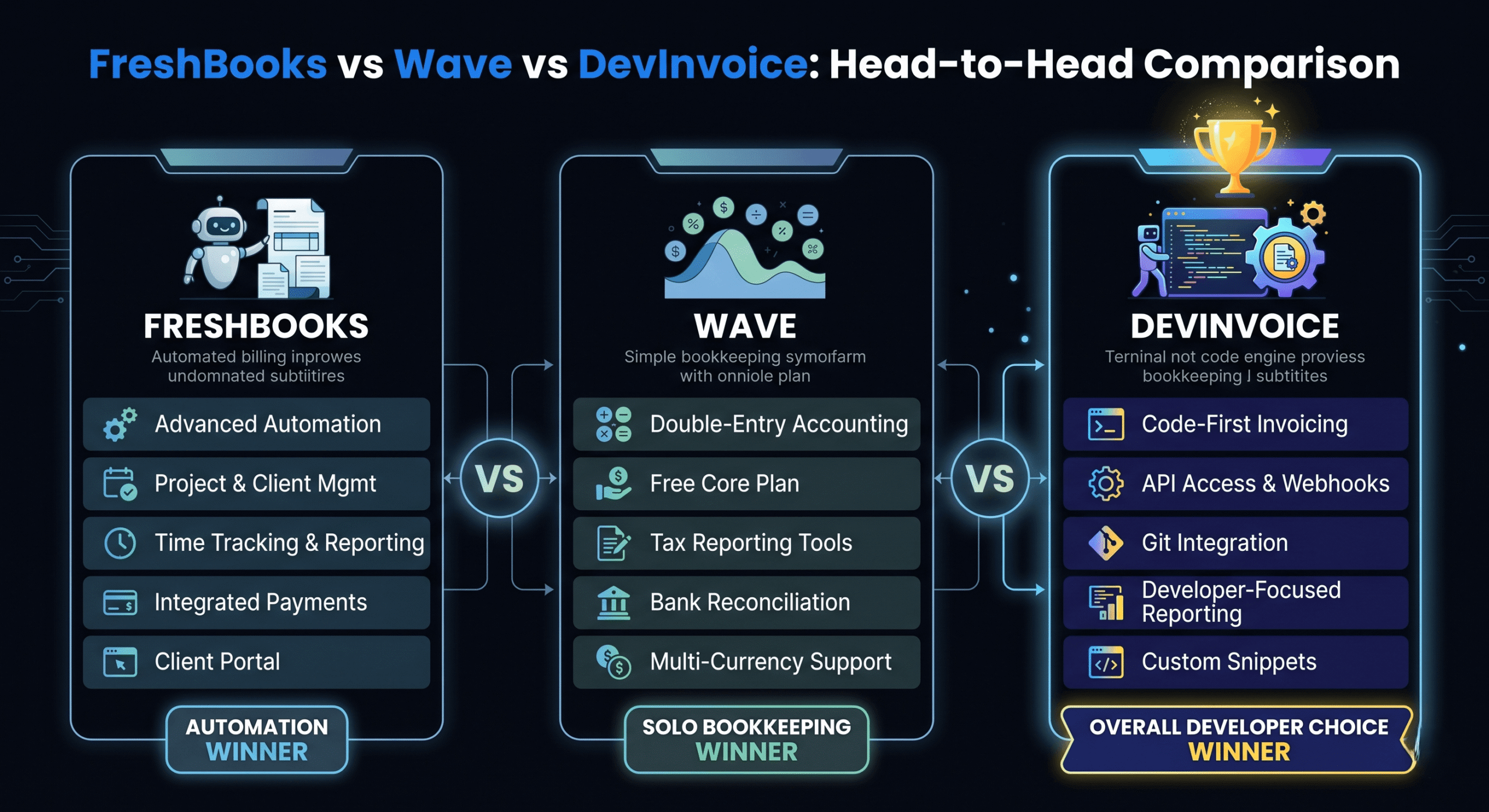
Choosing between FreshBooks vs Wave vs DevInvoice comes down to what you prioritize: comprehensive accounting features, a generous free plan, or a developer-first invoicing workflow. All three are legitimate tools used by thousands of freelancers — but they serve different needs and different audiences.
This is an honest, side-by-side comparison from the perspective of developers, web professionals, and tech freelancers. We’ll cover pricing, features, integrations, user experience, and the specific scenarios where each tool excels.
Quick Comparison Overview
| Feature | FreshBooks | Wave | DevInvoice |
| Starting Price | $19/month | $0 (free) | $0 (Pro $4.99/mo) |
| Free Plan | 30-day trial only | Yes (unlimited) | Yes (unlimited) |
| Stripe Integration | Yes | Yes | Yes |
| Recurring Invoices | All plans | Yes | Pro plan |
| Multi-Currency | Yes | Yes | Yes |
| Time Tracking | Built-in | No | Via Asana integration |
| Asana Integration | No native | No | Yes (native) |
| Accounting Features | Full suite | Full suite | Invoicing focused |
| Mobile App | iOS + Android | iOS + Android | Mobile-optimized web |
| Client Portal | Yes | No | Dashboard view |
| Dark Mode UI | No | No | Yes |
| Target Audience | Service businesses | Small businesses | Developers & tech |
FreshBooks: The Full-Featured Accounting Platform
FreshBooks is the most comprehensive tool of the three, combining invoicing with full double-entry accounting, expense tracking, time tracking, proposals, and a client portal. It’s designed for service-based businesses that need an all-in-one financial platform.
Strengths
- Polished, intuitive interface that’s easy to learn
- Built-in time tracking with invoice generation from tracked hours
- Client portal for invoice viewing and payment
- Proposals and estimates with conversion to invoices
- Strong reporting and financial dashboards
- Excellent customer support (phone + email)
Weaknesses
- No free plan — only a 30-day trial. Starts at $19/month for 5 billable clients
- Per-client pricing model gets expensive as you grow (Plus plan: $33/month for 50 clients)
- No native Asana or PM tool integration
- Designed for generalists, not developer-specific workflows
- No dark mode UI
Best for: Consultants, creative agencies, and service professionals who want a complete accounting + invoicing platform and don’t mind paying $19–$60/month.
Wave: The Generous Free Option
Wave is the reigning champion of free invoicing and accounting software. It offers unlimited invoicing, full accounting, bank connections, and receipt scanning — all genuinely free. Wave makes money through payment processing fees and optional paid add-ons.
Strengths
- Truly free invoicing and accounting with no artificial limits
- Bank account connections and automatic transaction import
- Receipt scanning and expense categorization
- Financial reports (P&L, balance sheet, cash flow)
- Clean, straightforward interface
Weaknesses
- No project management or PM tool integrations
- No time tracking built-in or via integration
- Limited invoice customization
- No dark mode, no developer-specific features
- Payment processing fees are slightly higher than competitors (2.9% + $0.60 per card transaction)
- Customer support limited to chatbot on free plan
Best for: New freelancers and small businesses who need free invoicing paired with basic accounting. Excellent for getting started with $0 investment.
DevInvoice: Purpose-Built for Developers
DevInvoice takes a different approach: instead of trying to be everything, it focuses specifically on the invoicing workflow that developers and tech freelancers actually use. It’s fast, modern, and designed around the tools developers already rely on.
Strengths
- Free plan with 10 invoices, 3 clients, and task management
- Asana integration — convert tracked tasks directly to invoice line items
- Dark-mode dashboard designed for developer aesthetics
- Stripe payment integration with one-click client payments
- Multi-currency support for international clients
- Professional PDF exports with custom branding
- Pro plan at $4.99/month (recurring invoices, advanced features)
- Fast, modern UI built for efficiency
Weaknesses
- No built-in accounting features (invoicing-focused)
- Newer platform with smaller user base than FreshBooks/Wave
- Recurring invoices require Pro plan
- No native mobile app (mobile-optimized web)
Best for: Freelance developers, web professionals, and tech freelancers who want fast, beautiful invoicing with Asana integration and don’t need full accounting in the same tool.
Which Tool Should You Choose?
Here’s the decision framework:
- Choose FreshBooks if: You need invoicing AND full accounting in one platform, you don’t mind paying $19+/month, and you value a polished all-in-one experience with phone support.
- Choose Wave if: Budget is your top priority, you need free invoicing AND accounting, and you don’t need PM tool integrations or developer-specific features.
- Choose DevInvoice if: You’re a developer or tech freelancer, you want the fastest invoice-to-payment workflow, you use Asana for project management, and you prefer a modern, dark-mode UI built for your workflow.
Many freelancers combine tools: DevInvoice for invoicing + Wave for accounting gives you the best of both worlds at minimal cost ($0–$4.99/month).
Frequently Asked Questions
Can I switch from FreshBooks or Wave to DevInvoice?
Yes. You can export your client list and invoice history from both platforms and set up DevInvoice alongside or as a replacement. The transition typically takes less than an hour.
Is DevInvoice really free?
Yes. The free plan includes 3 invoices, 2 clients, task management, and PDF export. The Pro plan ($4.99/month) unlocks unlimited invoices, unlimited clients, public invoice links, removed branding, and priority support.
Do I need accounting software in addition to an invoicing tool?
For solo freelancers earning under $100K, a good invoicing tool plus a simple income tracker spreadsheet covers 90% of your needs. Add dedicated accounting software (Wave or QuickBooks) when your financial complexity or tax situation requires it.
Which tool has the best payment experience for clients?
All three support Stripe for card payments. DevInvoice’s implementation is the most streamlined — the payment link is embedded directly in the invoice with one-click access. FreshBooks and Wave also embed payment links but with slightly more steps in the client flow.
Try DevInvoice Free
The best way to evaluate an invoicing tool is to use it. Create a free DevInvoice account, send your first invoice, and experience the developer-first workflow for yourself.