Getting paid by credit card is no longer a luxury — it’s an expectation. Clients want to click a link, enter their card, and be done. Stripe invoicing for freelancers makes this possible by letting you embed payment links directly in your invoices, accept cards from 135+ countries, and receive funds in 1–2 business days.
Yet many freelancers avoid Stripe because they’re unsure about fees, setup complexity, or how it integrates with their invoicing workflow. This guide covers everything: how Stripe works, what it costs, how to set it up step-by-step, and how to connect it to your invoicing tool for seamless payment collection.
Why Stripe Is the Best Payment Gateway for Freelancers
Stripe has become the default payment processor for modern businesses, and for good reason. Here’s why it’s the top choice for freelancers:
- Global reach: Accept payments from clients in 135+ countries with support for 135+ currencies.
- Fast payouts: Funds arrive in your bank account within 2 business days (or next-day with Stripe Express).
- Professional experience: Clients see a clean, branded checkout page. No redirects to a third-party site that looks suspicious.
- One-click payments: Returning clients can pay with saved payment methods in seconds.
- Automatic receipts: Stripe sends payment confirmation to the client automatically, saving you the step.
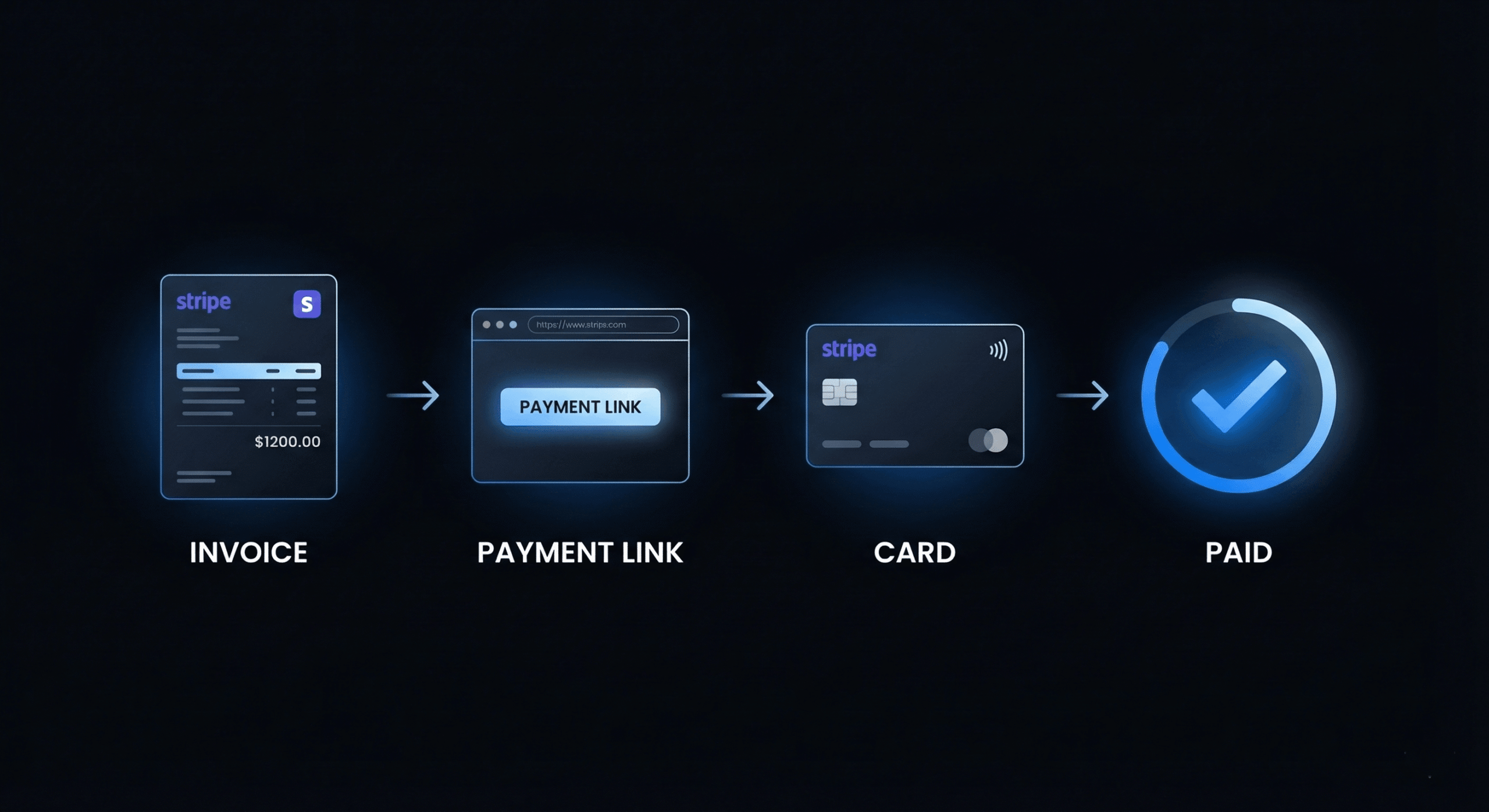
- Invoicing integration: Tools like DevInvoice embed Stripe payment links directly in your invoice PDF — zero friction between receiving the invoice and paying it.
Stripe Fees Breakdown for Freelancers
Understanding Stripe’s fee structure helps you decide whether to absorb the fees or pass them to clients:
| Transaction Type | Fee | Notes |
| Domestic card payment | 2.9% + $0.30 | Standard for US-issued cards |
| International card | 3.9% + $0.30 | Additional 1% for cross-border |
| Currency conversion | 1% additional | When client pays in different currency |
| ACH bank transfer | 0.8% (max $5) | Much cheaper; 3–5 day settlement |
| Instant payouts | 1% of payout amount | Get funds in minutes vs. 2 days |
| Chargebacks/disputes | $15 per dispute | Refunded if you win the dispute |
Should you absorb fees or pass them to clients? Most freelancers absorb Stripe fees as a cost of doing business (similar to how stores absorb card processing fees). The convenience of instant card payment typically outweighs the 2.9% cost through faster payment and fewer late invoices.
How to Set Up Stripe for Your Freelance Invoicing
Step 1: Create Your Stripe Account
Go to stripe.com and sign up. You’ll need your legal business name (or personal name for sole proprietors), address, bank account for payouts, tax ID (EIN or SSN for US), and a brief description of your services. Verification typically takes 1–2 business days.
Step 2: Configure Your Payout Settings
In the Stripe Dashboard, go to Settings > Payouts. Choose your payout schedule (daily, weekly, or monthly) and verify your bank account. For most freelancers, daily automatic payouts work best — you receive funds as soon as they clear.
Step 3: Connect Stripe to Your Invoicing Tool
In DevInvoice, go to Settings > Payment Integration > Connect Stripe. Click the connect button, authorize the connection, and Stripe is linked to your account. Every invoice you create from this point forward will automatically include a Stripe payment link.
Step 4: Send Your First Invoice with Stripe Payment
Create an invoice normally (see our how to create an invoice guide). The Stripe payment link is automatically embedded. When the client clicks “Pay Now” on the invoice, they’re taken to a branded Stripe checkout page where they can pay by card.
Step 5: Track Payments in Your Dashboard
When a client pays, you’ll see the payment status update in both Stripe and your invoicing dashboard. DevInvoice marks the invoice as “Paid” automatically and timestamps the payment for your records.
Stripe vs. PayPal vs. Bank Transfer for Freelancers
| Feature | Stripe | PayPal | Bank Transfer |
| Fee (domestic) | 2.9% + $0.30 | 3.49% + $0.49 | $0–$25 wire fee |
| Payout speed | 2 days | Instant to balance | 3–5 days |
| Client experience | Branded checkout | PayPal redirect | Manual transfer |
| Invoice integration | Embedded link | Separate link | No link (manual) |
| International | 135+ countries | 200+ countries | SWIFT/IBAN |
| Disputes | $15/dispute | $20/dispute | N/A |
| Recurring billing | Yes (auto-charge) | Yes | No |
Bottom line: Stripe offers the best combination of low fees, professional client experience, and invoice integration. PayPal is a solid backup for clients who prefer it. Bank transfer is cheapest but creates the most friction and slowest payment cycle.
5 Ways Stripe Helps You Get Paid Faster
- One-click payment links. The client opens the invoice, clicks “Pay Now,” and enters their card. No searching for bank details, no writing checks.
- Saved payment methods. Returning clients can pay with one click using their saved card. This is especially powerful for recurring invoices.
- Auto-charge for retainers. Set up automatic billing: Stripe charges the client’s card on schedule. Zero-touch payment collection.
- Instant payment confirmation. Both you and the client get immediate notification when payment processes. No “did my payment go through?” emails.
- Multi-currency acceptance. Accept payments in 135+ currencies. Clients pay in their currency, you receive in yours. See our multi-currency invoicing guide for details.
Stripe Security and Compliance
Client payment security is non-negotiable. Stripe handles the heavy lifting:
- PCI-DSS Level 1 compliant: The highest level of payment security certification. You never see or store client card numbers.
- 3D Secure authentication: Supports SCA (Strong Customer Authentication) requirements for European clients.
- Fraud detection: Stripe Radar uses machine learning to identify and block fraudulent transactions automatically.
- Encrypted data: All data is encrypted in transit and at rest. Client card details never touch your server.
Common Stripe Issues and Solutions
- Payment failed / card declined: Ask the client to try a different card or use ACH bank transfer as a fallback.
- Payout delay: New Stripe accounts may have a 7-day payout hold initially. This reduces to 2 days after your account is established.
- International payment blocked: Some banks flag international transactions. Ask the client to contact their bank to authorize the payment.
- Dispute/chargeback: Respond promptly with evidence of the completed work (contract, deliverables, email trail). Stripe’s dispute process is straightforward.
Frequently Asked Questions
Do I need a business account to use Stripe?
No. Stripe supports sole proprietors. You can sign up with your personal name, address, and SSN. You don’t need an LLC or business bank account (though having a separate business account is recommended for bookkeeping).
Can my clients pay without creating a Stripe account?
Yes. Clients never need a Stripe account. They simply click the payment link and enter their card details on a secure checkout page. It’s as simple as any online purchase.
How do I handle Stripe fees on my invoice?
Most freelancers absorb the 2.9% + $0.30 fee. If you want to pass it to the client, add a “Payment processing fee” line item to the invoice. Be transparent about it.
Can I use Stripe for international clients?
Yes. Stripe supports 135+ countries and currencies. International transactions incur an additional 1% fee on top of the standard rate. For comprehensive guidance, see our multi-currency invoicing guide.
Start Accepting Card Payments on Your Invoices
Stripe integration is the single highest-impact change you can make to speed up your payment cycle. One-click payments from the invoice eliminate every friction point between “invoice received” and “payment sent.”